Before You Deploy: NestJS Performance, Security, and Production Checklist
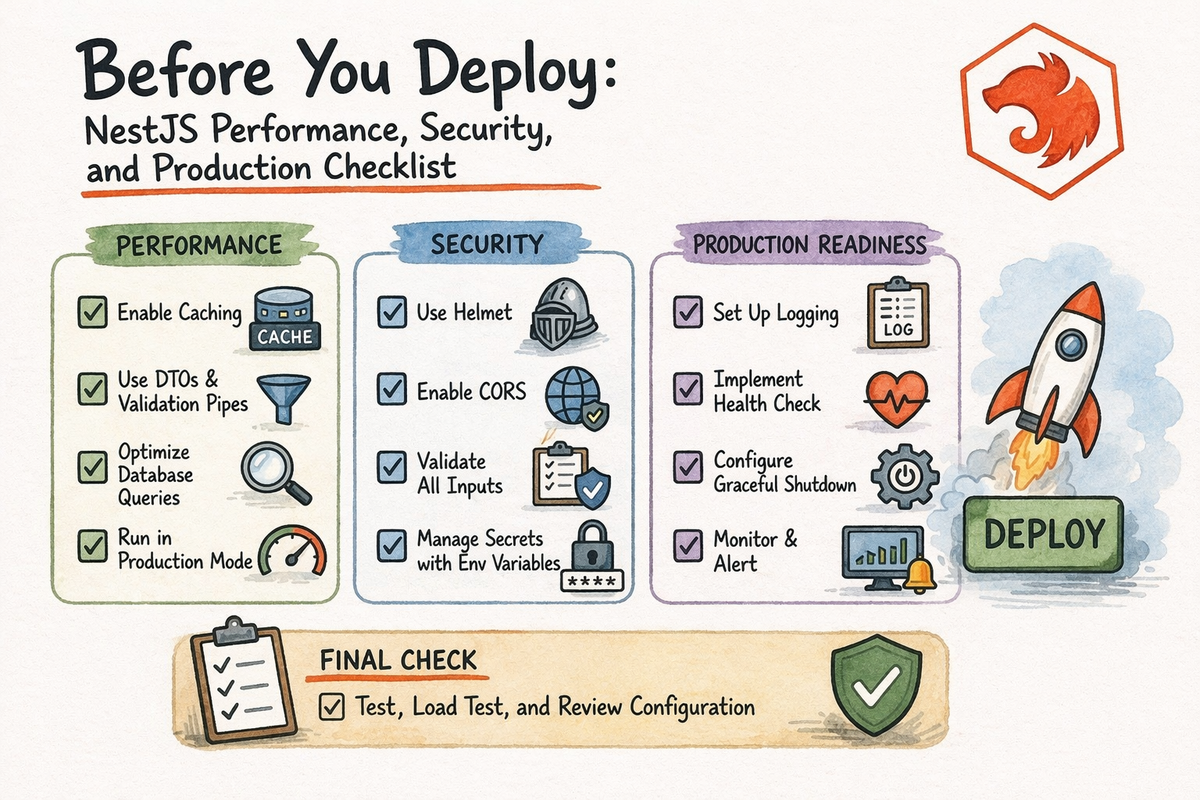
By the time you reach this point in the series, you have already done a lot.
You have learned:
- what NestJS is
- how to structure an app
- how the request lifecycle works
- how to build REST APIs
- how GraphQL fits in
- how to test
- how to debug
- how to think about scalable architecture
- when microservices do and do not make sense
That is a strong foundation.
But now we get to the part where things become very real:
production
Because there is a huge difference between:
- “the app works on my machine”
- and
- “the app is actually ready to run in the real world”
That difference usually lives in things like:
- validation
- configuration
- logging
- rate limiting
- security headers
- environment handling
- performance choices
- deployment hygiene
This article is your final pre-deploy guide.
Not in a dramatic “everything must be perfect” way.
More in a:
“before you ship this thing, here is what should be true”
kind of way.
By the end, you will have a practical NestJS production checklist you can use before launch.
Let’s make sure your app is not only built, but actually ready.
What Production Readiness Really Means
A production-ready app is not just an app that returns valid JSON.
It is an app that can:
- handle bad input safely
- protect routes and data responsibly
- run with predictable config
- give useful logs when things go wrong
- avoid obvious security mistakes
- perform reasonably under real use
- be deployed without guessing what is missing
Nest’s current deployment guide frames production preparation around exactly this kind of readiness: a working app, proper environment variables, required backing services, and an LTS Node.js runtime on the target platform.
So this is not about “enterprise for the sake of enterprise.”
It is about reducing the chance that deployment becomes an accidental stress test.
1. Configuration Should Be Centralized, Not Scattered
One of the fastest ways to create production bugs is to scatter process.env access all over the codebase.
That may feel harmless early on.
It is not harmless later.
Nest’s configuration docs still recommend using a dedicated configuration module and @nestjs/config so environment loading is centralized and app code depends on a ConfigService rather than random env access everywhere.
A healthy setup usually means:
- config is loaded in one place
- required variables are known clearly
- environment-specific values are easy to reason about
- services do not directly depend on mysterious env lookups everywhere
Example:
import { Module } from '@nestjs/common';
import { ConfigModule } from '@nestjs/config';

@Module({
  imports: [
    ConfigModule.forRoot({
      isGlobal: true,
    }),
  ],
})
export class AppModule {}
That alone already makes your app feel more production-aware.
Production check
Before deploy, make sure:
- every required env variable is documented
- secrets are not hardcoded
- local, staging, and production configs are separated clearly
- missing config fails loudly, not silently
Because “it worked locally” usually means nothing if the runtime config is different.
2. Validation Should Be Global and Strict
Nest’s validation docs still position ValidationPipe as the standard built-in mechanism for enforcing DTO-based rules on incoming payloads. They also document whitelist, forbidNonWhitelisted, and transform as especially important options.
That makes global validation one of the easiest production upgrades you can add.
Example:
import { NestFactory } from '@nestjs/core';
import { ValidationPipe } from '@nestjs/common';
import { AppModule } from './app.module';

async function bootstrap() {
  const app = await NestFactory.create(AppModule);

  app.useGlobalPipes(
    new ValidationPipe({
      whitelist: true,
      forbidNonWhitelisted: true,
      transform: true,
    }),
  );

  await app.listen(process.env.PORT ?? 3000);
}
bootstrap();
Why this matters:
whitelist: truestrips unexpected fieldsforbidNonWhitelisted: truerejects unexpected fields instead of silently tolerating themtransform: truehelps convert incoming values into expected types
That means your API becomes:
- stricter
- safer
- more predictable
- easier to trust
Production check
Before deploy, make sure:
- validation is not only route-by-route if the app expects global consistency
- DTOs exist for important write operations
- route params and query values are also validated or transformed where needed
Bad input handling is one of the easiest ways to create weird production behavior.
3. CORS Should Be Deliberate
Nest’s CORS docs still explain that CORS is the mechanism that allows resources to be requested from another domain, and that Nest uses the underlying Express or Fastify CORS packages depending on platform.
That means production CORS should not be:
- “turn on everything and hope”
- or
- “leave defaults and see what breaks”
A more deliberate setup looks like this:
const app = await NestFactory.create(AppModule);

app.enableCors({
  origin: ['https://yourfrontend.com'],
  methods: ['GET', 'POST', 'PUT', 'PATCH', 'DELETE'],
  credentials: true,
});
Production check
Before deploy, make sure:
- allowed origins are intentional
- methods are explicit if needed
- credentials are only enabled when your app truly needs them
- you are not using
origin: '*'together with credentialed requests
CORS bugs are annoying.
Overly open CORS is worse.
4. Add Helmet for Safer Default Security Headers
Nest’s security docs still recommend Helmet as a practical way to protect apps from some common web vulnerabilities by setting appropriate HTTP headers.
This is one of the easiest worthwhile security steps you can take.
Example:
import helmet from 'helmet';

const app = await NestFactory.create(AppModule);
app.use(helmet());
That does not make your app magically secure.
But it is a very good baseline.
Production check
Before deploy, make sure:
- Helmet is enabled unless you have a specific reason not to
- any custom CSP or header behavior is configured intentionally
- you test frontend behavior if strict headers affect assets or embedding
This is a small step with a very reasonable payoff.
5. Rate Limiting Should Protect Sensitive Endpoints
Nest’s rate limiting docs still recommend @nestjs/throttler as the standard way to protect applications against brute-force style abuse.
This matters a lot for endpoints like:
- login
- password reset
- OTP verification
- signup
- public contact forms
- expensive public APIs
Basic setup:
import { Module } from '@nestjs/common';
import { ThrottlerModule } from '@nestjs/throttler';

@Module({
  imports: [
    ThrottlerModule.forRoot([
      {
        ttl: 60000,
        limit: 10,
      },
    ]),
  ],
})
export class AppModule {}
Production check
Before deploy, make sure:
- public auth endpoints are not fully unprotected
- abuse-sensitive routes have sane limits
- you understand which routes need stricter controls than others
Not every endpoint needs the same policy.
But some absolutely need one.
6. CSRF Protection Depends on Your Auth Model
Nest’s CSRF docs still describe CSRF as attacks where unauthorized commands are sent from a trusted user’s browser, and they point to csrf-csrf as the current recommended package for prevention.
This is where nuance matters.
If your app uses:
- cookie-based browser sessions
- authenticated forms
- stateful browser auth
then CSRF protection matters a lot.
If your API is:
- pure token-based
- stateless
- consumed by mobile apps or non-browser clients
then the risk model may be different.
Production check
Before deploy, make sure:
- you understand whether your auth style creates CSRF exposure
- cookie-based auth is not treated like token-based auth by accident
- CSRF is handled where it actually applies
This is not a checkbox to cargo-cult.
It is a model to understand.
7. Authentication and Authorization Must Be Verified in Real Flows
A lot of apps “have auth” in theory.
That is not the same as having auth that is production-ready.
At minimum, before deploy you should know:
- which routes are public
- which routes are authenticated
- which roles or permissions protect sensitive actions
- whether your guards actually work under e2e conditions
- whether secrets and signing keys are loaded correctly from config
This part is less about one Nest feature and more about not lying to yourself about what is protected.
Production check
Before deploy, verify:
- public routes are explicitly public
- private routes are explicitly guarded
- admin actions are not protected only by frontend logic
- tokens, sessions, or secrets are not hardcoded in source code
Security mistakes in this layer are expensive.
Very expensive.
8. Logging Should Be Useful, Structured, and Present
Nest’s docs include logging as a first-class technique, and production apps need logs that help answer:
- what happened
- where it happened
- when it happened
- under which request or job context it happened
A basic logger is already better than silence.
Example:
import { Injectable, Logger } from '@nestjs/common';

@Injectable()
export class UsersService {
  private readonly logger = new Logger(UsersService.name);

  findAll() {
    this.logger.log('Fetching all users');
    return [];
  }
}
What to log in production
Good production logging often includes:
- app startup information
- failed external service calls
- auth failures worth tracking
- unexpected exceptions
- important business events
- request IDs or correlation IDs when possible
Production check
Before deploy, make sure:
- logs exist for important flows
- logs are not only
console.logscattered randomly - sensitive data like passwords or raw secrets are never logged
- bootstrap errors are visible
No logs means slower debugging later.
Overly noisy logs also hurt.
Aim for useful.
9. Compression Helps, but Know Where It Belongs
Nest’s compression docs still say compression can greatly decrease response size and improve web performance. But they also explicitly say that for high-traffic production websites, compression is strongly recommended to be offloaded to a reverse proxy like Nginx, and in that case application-level compression middleware should not be used.
That is a really useful production detail.
So the rule is not:
“Always add compression middleware in the app.”
It is more like:
- app-level compression can help in some setups
- reverse-proxy compression is often the better production choice at scale
Production check
Before deploy, make sure:
- you know whether compression lives in the app or proxy layer
- you are not double-handling it unnecessarily
- you understand your hosting setup
That is a very real production concern.
10. Caching Should Be Intentional, Not Random
Nest’s caching docs still describe caching as a straightforward way to improve performance by reducing repeated fetches and computations.
Caching can help with:
- expensive reads
- repeated public data
- external API responses
- slow derived results
- frequently requested lookups
But caching without a plan creates its own problems.
Production check
Before deploy, make sure:
- you know what is cached
- you know how long it stays cached
- you know what invalidates it
- you are okay with the freshness trade-off
Fast stale bugs are still bugs.
So yes, cache.
Just do it on purpose.
11. Performance Is More Than “Use Fastify”
Nest does document Fastify as a performance-oriented platform option, and that can matter. But production performance usually depends more on broader decisions like:
- unnecessary work in request paths
- missing caching
- inefficient database queries
- overusing request scope
- synchronous work that could be async
- oversized payloads
- noisy serialization
So the better performance mindset is:
- reduce unnecessary work
- avoid slow request paths
- measure hot spots
- cache wisely
- move non-critical work out of the request lifecycle
Production check
Before deploy, ask:
- what endpoints are hottest?
- what work can move to background jobs?
- are DTOs and responses larger than they need to be?
- are you doing repeated expensive lookups on every request?
That is usually where real gains come from.
12. Database Readiness Is Part of Deployment Readiness
Nest is database-agnostic, but the production checklist still needs database reality checks.
Before deploy, know:
- is the connection string correct?
- are migrations or schema changes applied?
- do credentials come from config, not source code?
- are timeouts and retries sane?
- will the target environment actually reach the database?
Nest’s deployment guide explicitly includes “required services like a database” as a production prerequisite.
A very common launch bug is not code.
It is “the app cannot talk to the real database.”
Not glamorous. Very common.
13. Production Build and Runtime Basics Should Be Boring
That is a compliment.
Production startup should be boring.
You should know:
- how the app builds
- how the app starts
- which Node version is used
- what health or smoke checks exist
- whether the environment variables are present
- whether the port and reverse proxy setup are correct
Nest’s deployment docs explicitly recommend an LTS Node.js version on the deployment platform and make readiness around env vars and dependencies part of the baseline checklist.
Production check
Before deploy, make sure:
- the runtime uses an LTS Node version
- the build command is known and repeatable
- the startup command is known and repeatable
- the app starts cleanly without local-only assumptions
If boot is already fragile before launch, launch will not improve it.
14. Error Handling Should Be Predictable
By production time, your app should not return:
- random stack traces
- inconsistent error shapes
- HTML errors for JSON APIs
- vague auth failures
- noisy framework leakage when cleaner responses are expected
Nest already gives you strong tools here:
- validation pipe
- built-in exceptions
- exception filters
- guards
- interceptors
The production question is not whether those tools exist.
It is whether your app uses them consistently.
Production check
Before deploy, verify:
- validation errors are readable
- unauthorized and forbidden responses are distinct
- not-found cases behave predictably
- internal errors do not expose sensitive internals
Error quality matters more in production than people think.
15. Pre-Deploy Checklist You Can Actually Use
Here is the practical version.
Configuration
- all required env vars are present
- secrets are not hardcoded
- config is centralized
- staging and production values are clearly separated
Input Safety
- global validation is enabled
- DTOs exist for write operations
- route params and query values are transformed or validated
Security
- Helmet is enabled
- CORS is configured intentionally
- rate limiting protects sensitive routes
- CSRF is considered if browser cookies/sessions are involved
- auth and authorization rules are verified
Performance
- caching is used intentionally where needed
- compression strategy is known
- heavy work is not all in the request path
- hot endpoints are understood
Operations
- logging is useful
- error responses are consistent
- database connectivity is verified
- startup/build/runtime commands are documented
- target environment uses an LTS Node version
That is already a strong launch checklist.
Not perfect.
Strong.
Common Beginner Production Mistakes
Let’s prevent a few.
1. Shipping with local assumptions
Things like:
- local DB hostnames
- missing env vars
- permissive CORS copied from dev
- debug-only behavior left on
2. Thinking “no one will hit this route much”
That sentence has caused a lot of rate-limiting regrets.
3. Logging sensitive data
Never let debugging convenience become a security incident.
4. Trusting frontend protection
Frontend route hiding is not backend authorization.
5. Treating Swagger as production hardening
Swagger is useful.
It is not security, validation, or rate limiting.
6. Skipping validation because “the frontend sends the right shape”
That trust is adorable.
Do not deploy on it.
A Good Mental Model to Remember
Here is the simplest production mindset:
- validation protects your inputs
- config protects your environments
- logging protects your debugging future
- security headers and policies protect your surface area
- rate limiting and auth protect your abuse boundaries
- caching and async design protect your performance
- checklists protect you from forgetting obvious things
That is the production mindset.
Not glamorous.
Very useful.
Why This Chapter Matters
This chapter matters because deployment is where theory meets consequence.
Before production, mistakes are educational.
After production, mistakes are operational.
That does not mean you need perfection.
It means you need awareness.
A good launch is not just:
- routes exist
- tests pass
- docs render
A good launch is also:
- config is right
- security basics are in place
- performance pitfalls are understood
- failure is easier to observe and handle
That is what makes an app feel responsible.
And that is the right way to finish this series.
Final Thoughts
A production-ready NestJS app is not defined by fancy architecture alone.
It is defined by whether the basics are handled well:
- config is centralized,
- validation is strict,
- security headers and policies are intentional,
- rate limiting protects exposed surfaces,
- caching and compression are used thoughtfully,
- logs and errors are operationally useful,
- and deployment assumptions are explicit.
That is the real production checklist.
Not “make it fancy.”
Make it:
- predictable
- safe
- observable
- maintainable
If you do that, your app already has a much better chance of surviving the real world.
And that is a pretty good place to end a NestJS beginner series.
FAQ
What should I check before deploying a NestJS app?
At minimum, check configuration, environment variables, validation, CORS, Helmet, authentication and authorization, rate limiting, logging, database connectivity, and startup/runtime readiness. Nest’s current deployment and security docs support all of these areas directly.
Should I use ValidationPipe in production NestJS apps?
Yes. Nest’s validation docs still present ValidationPipe as the standard built-in way to enforce validation rules on incoming payloads.
Does NestJS support rate limiting officially?
Yes. Nest’s current rate-limiting docs recommend @nestjs/throttler as the official way to protect routes against brute-force style abuse.
Should I enable Helmet in NestJS?
Usually yes. Nest’s Helmet docs describe it as a practical way to set security-related HTTP headers and protect against some common web vulnerabilities.
Should NestJS apps use compression middleware in production?
Sometimes, but Nest’s compression docs explicitly note that on high-traffic production sites, compression is often better handled at the reverse-proxy layer instead of in the application itself.
How should I manage configuration in a NestJS production app?
Nest’s config docs recommend a dedicated configuration module and @nestjs/config so env handling is centralized and easier to reason about across environments.
Suggested Internal Links for CodeWithZiye.com
- REST API Best Practices in NestJS: Validation, Versioning, and Swagger
- Debugging NestJS Apps: Common Problems and How to Find Them Faster
- When a NestJS App Starts Growing: Scalable Architecture Basics
- NestJS Microservices for Beginners: When and How to Split Services