Understanding Modules, Controllers, and Providers in NestJS
Now that your first NestJS project is running, it is time for the question every beginner asks:
What are all these files actually doing?
You open the project and see things like:
app.module.tsapp.controller.tsapp.service.ts
And at first it kind of feels like NestJS is politely handing you a well-organized toolbox without explaining what half the tools do.
Fair.
The good news is that once you understand modules, controllers, and providers, NestJS starts making a lot more sense.
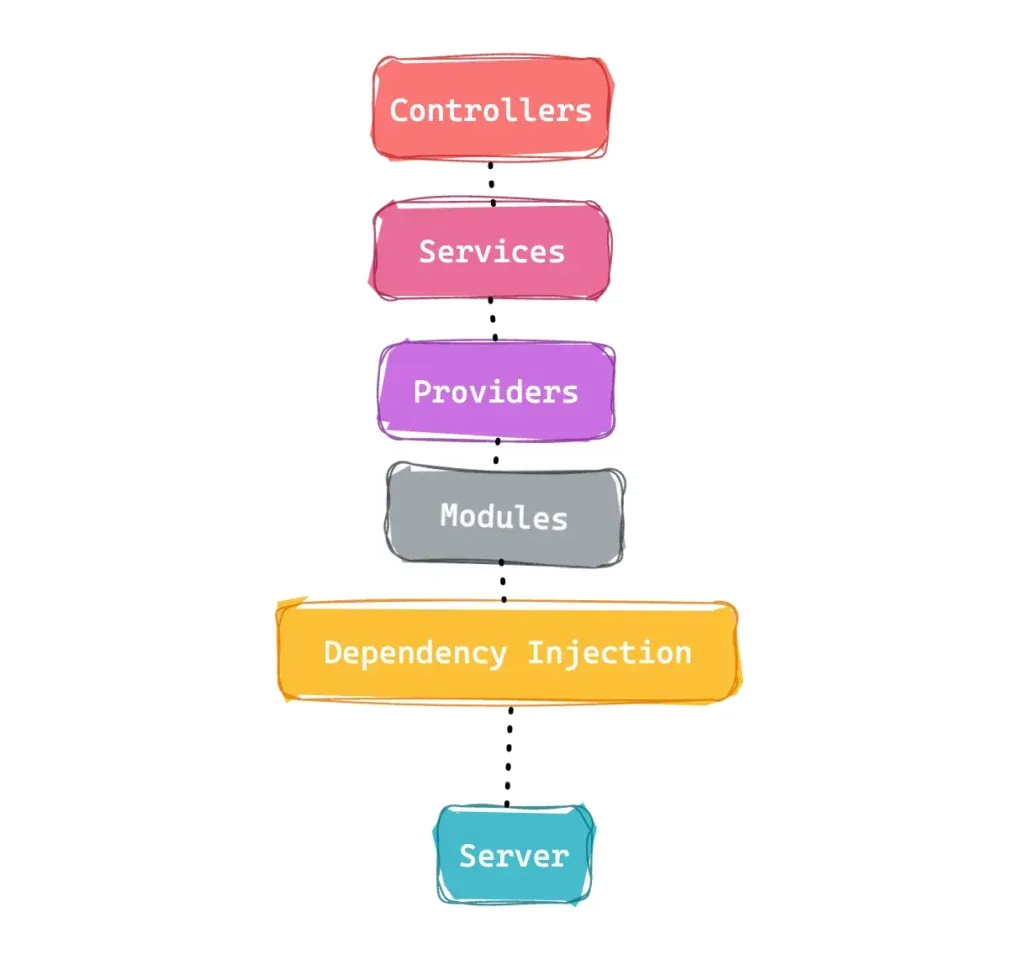
These three ideas are the core building blocks of a NestJS app.
So in this article, we are going to make them simple.
By the end, you will understand:
- what a module is
- what a controller does
- what a provider is
- how they work together
- why NestJS feels so structured compared to random Node.js projects
Let’s break it down.
Why These Three Pieces Matter So Much
If NestJS had a basic “starter pack,” it would definitely include:
- modules
- controllers
- providers
Why?
Because almost everything you build in NestJS is organized around them.
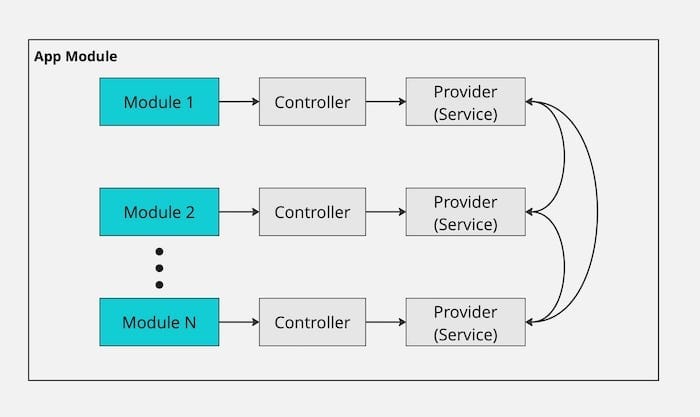
When a request comes into your app:
- the controller receives it
- the provider usually handles the logic
- the module organizes both of them into one feature area
That is the core idea.
It is not complicated.
It is just structured.
And honestly, that structure is one of the biggest reasons people like NestJS.
What Is a Module in NestJS?
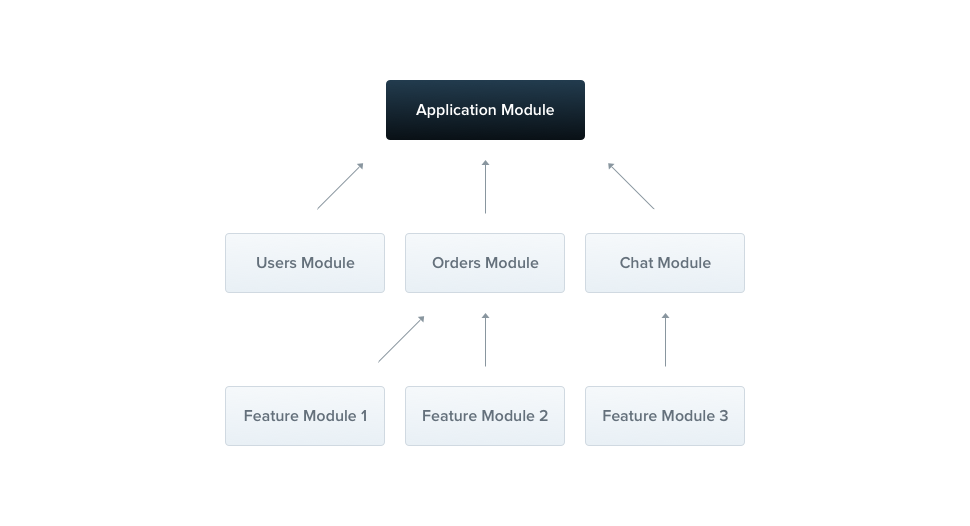
A module is the way NestJS organizes parts of your application.
Think of a module like a feature container.
If your app has different areas, you might eventually create modules like:
UsersModuleAuthModulePostsModuleProductsModule
Each module groups together the files related to one feature.
So instead of your app becoming one giant mess of routes, services, helpers, validators, and “temporary” files that somehow become permanent, NestJS encourages you to group related things together.
That is what a module does.
A Simple Way to Think About It
A module is like a room in a house.
The kitchen holds kitchen stuff.
The bathroom holds bathroom stuff.
The auth module holds auth stuff.
Very civilized.
What a Module Usually Contains
A module can contain:
- controllers
- providers
- imported modules
- exported providers
In a small beginner project, you usually start with one root module:
import { Module } from '@nestjs/common';
import { AppController } from './app.controller';
import { AppService } from './app.service';

@Module({
  imports: [],
  controllers: [AppController],
  providers: [AppService],
})
export class AppModule {}
This is your root module.
It tells Nest:
- which controllers belong here
- which providers belong here
- what this part of the app is made of
So if NestJS were a company, the module would be the team manager keeping the right people in the right department.
What Is a Controller in NestJS?
A controller is responsible for handling incoming requests and returning responses.
This is the part that deals with routes like:
GET /usersPOST /auth/loginGET /posts
If a client sends a request, the controller is often the first place in your code that handles it.
What Controllers Should Do
A controller should:
- receive the request
- extract parameters, query values, or body data
- call the right provider or service
- return the result
That is it.
A controller is not supposed to become a giant place where all your business logic lives.
That is a very common beginner mistake.
A Basic Controller Example
import { Controller, Get } from '@nestjs/common';

@Controller()
export class AppController {
  @Get()
  getHello(): string {
    return 'Hello from NestJS!';
  }
}
What is happening here?
@Controller()tells Nest this class is a controller@Get()tells Nest this method handlesGETrequests- the method returns a string as the response
Pretty clean.
Now imagine a slightly more realistic example:
import { Controller, Get } from '@nestjs/common';
import { UsersService } from './users.service';

@Controller('users')
export class UsersController {
  constructor(private readonly usersService: UsersService) {}

  @Get()
  findAll() {
    return this.usersService.findAll();
  }
}
Now the controller is not doing everything itself.
It delegates the real work to a service.
That is exactly the habit you want.
What Is a Provider in NestJS?
A provider is a class that can be injected into other parts of your application.
In real life, this usually means a service.
A provider often contains:
- business logic
- database calls
- reusable app logic
- integration logic
- helper behavior used by other classes
So if the controller is the part that answers the door, the provider is the part that actually does the work after the door opens.
A Basic Provider Example
import { Injectable } from '@nestjs/common';

@Injectable()
export class UsersService {
  findAll() {
    return [
      { id: 1, name: 'Alice' },
      { id: 2, name: 'Bob' },
    ];
  }
}
What is happening here?
@Injectable()tells Nest this class can be managed by the dependency injection system- this service can now be injected into a controller or another provider
- the controller does not need to manually create it with
new
That is where Nest starts to feel very nice.
You define the class once, register it in a module, and then Nest handles the wiring.
Less manual setup.
Less messy dependencies.
Less pain.
How Modules, Controllers, and Providers Work Together
This is the part that makes everything click.
Let’s say you are building a simple users feature.
You might have:
users.module.tsusers.controller.tsusers.service.ts
Flow of Responsibility
Here is the normal flow:
- A request comes in to
/users - The controller receives it
- The controller calls the provider
- The provider runs the business logic
- The result goes back through the controller as the response
- The module is the structure that groups these pieces together
So the relationship looks like this:
- module = organizes the feature
- controller = handles the request
- provider = handles the logic
That is the heart of a NestJS app.
A Full Mini Example
users.service.ts
import { Injectable } from '@nestjs/common';

@Injectable()
export class UsersService {
  findAll() {
    return [
      { id: 1, name: 'Alice' },
      { id: 2, name: 'Bob' },
    ];
  }
}
users.controller.ts
import { Controller, Get } from '@nestjs/common';
import { UsersService } from './users.service';

@Controller('users')
export class UsersController {
  constructor(private readonly usersService: UsersService) {}

  @Get()
  findAll() {
    return this.usersService.findAll();
  }
}
users.module.ts
import { Module } from '@nestjs/common';
import { UsersController } from './users.controller';
import { UsersService } from './users.service';

@Module({
  controllers: [UsersController],
  providers: [UsersService],
})
export class UsersModule {}
Now you can probably see the pattern much more clearly.
And once you see the pattern, NestJS starts feeling less magical and more logical.
Why NestJS Separates These Responsibilities
This structure is not here just to look nice.
It exists because it solves real problems.
1. It Keeps Code Organized
You always know roughly where something belongs.
- route logic? controller
- business logic? provider
- feature grouping? module
That alone saves a lot of confusion later.
2. It Makes Code Easier to Maintain
If your controller becomes huge, you know something is wrong.
If all your app logic is spread across random files, you know something is wrong.
Nest gives you a structure that makes bad organization easier to spot.
3. It Improves Reusability
Providers can be reused in multiple places.
For example, one service might be injected into:
- a controller
- another service
- a background job
- a resolver later on
That is much better than duplicating logic all over the place.
4. It Makes Testing Easier
When logic lives in providers instead of controllers, it becomes easier to test that logic directly.
That is one of those long-term benefits that becomes more obvious as your app grows.
Common Beginner Confusion
Let’s clear up a few things that usually confuse people at this stage.
“Is a service the same as a provider?”
Usually, yes in beginner projects.
A service is the most common kind of provider.
But “provider” is the broader Nest term.
Not every provider has to be called a service, but many of them are.
“Can a controller talk directly to the database?”
Technically, you can do whatever you want.
But you usually should not.
That logic belongs in a provider or service.
Controllers should stay focused on request handling.
“Why do I need a module for everything?”
Because modules help Nest understand how your app is organized.
They also help you keep feature boundaries clean as the project grows.
A tiny app may only have one module at first, but real apps usually end up with many feature modules.
“What if I put everything in one file?”
You can.
And for about twelve minutes, it may feel efficient.
Then your app grows, and you start making the exact kind of mess NestJS was designed to help you avoid.
So yes, technically possible.
Emotionally expensive.
A Real-World Mental Model
Here is one of the easiest ways to remember the three parts:
Module = the feature box
It groups related things together.
Controller = the traffic handler
It receives requests and decides where they go.
Provider = the worker
It does the actual business logic.
So if somebody requests /users:
- the controller catches the request
- the provider gets the data
- the module is the feature boundary that keeps everything organized
Simple.
That mental model is enough to get most beginners moving in the right direction.
Why This Structure Feels Better Than a Random Express App
This is where NestJS starts to shine.
In a plain Express app, you can absolutely create your own clean structure.
But you have to design and enforce that structure yourself.
Nest gives you a strong default pattern:
- organize by feature
- separate request handling from business logic
- use providers through dependency injection
- keep modules as feature boundaries
That is why many people say NestJS feels more scalable and team-friendly.
Not because it does magic.
Because it encourages better structure from day one.
What You Should Remember from This Article
If you only remember three things, remember these:
1. Modules organize your application
They group related controllers and providers together.
2. Controllers handle incoming requests
They define routes and return responses.
3. Providers contain business logic
They do the real work and can be injected into other classes.
That is the foundation.
And once this part makes sense, a lot of the rest of NestJS gets easier.
Final Thoughts
Modules, controllers, and providers are the three building blocks that make NestJS feel structured.
At first, they may seem like extra framework vocabulary.
But once you understand their roles, they actually make backend development feel much cleaner.
Instead of putting everything everywhere, NestJS encourages you to separate responsibilities:
- organize with modules
- handle requests with controllers
- keep logic in providers
That separation is a big reason why NestJS scales so well as projects grow.
And more importantly, it makes your code easier to understand even when you come back to it later with less memory, less energy, and more coffee.
Now that you understand the basic structure of a NestJS app, the next step is learning one of the most important ideas behind it:
Because once DI clicks, NestJS starts feeling a lot less like magic and a lot more like a very smart system.
Great in the next chapter, we will talk about "Why Dependency Injection Makes NestJS Feel So Clean"
FAQ
What is a module in NestJS?
A module organizes related parts of a NestJS application, such as controllers and providers, into a feature area.
What does a controller do in NestJS?
A controller handles incoming requests and returns responses.
What is a provider in NestJS?
A provider is a class that can be injected into other classes. In most beginner examples, this is usually a service that contains business logic.
Why does NestJS use modules, controllers, and providers?
Because this structure helps keep applications organized, scalable, and easier to maintain.
Can I build a NestJS app without understanding these three things?
You can copy and run code without fully understanding them, but these three concepts are the foundation of how NestJS works. Learning them early makes everything else easier.