NestJS Microservices for Beginners: When and How to Split Services
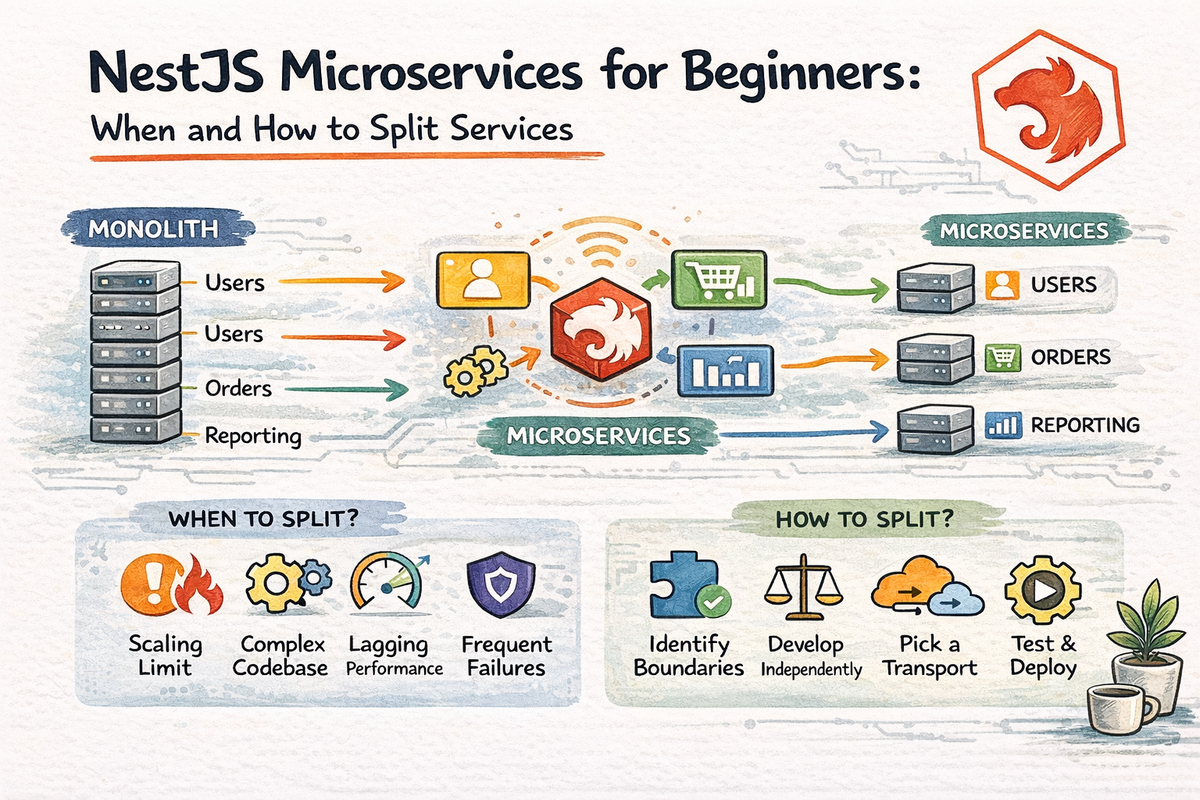
Once a NestJS app starts growing, a very specific kind of curiosity shows up.
It usually sounds like this:
- “Should we split this into microservices?”
- “Maybe this module should be its own service.”
- “This architecture diagram would look way cooler with message queues.”
- “Surely this is the point where everything becomes distributed.”
And honestly, fair enough.
Microservices are one of those topics that sound powerful, modern, and slightly intimidating all at once.
But here is the important thing:
a bigger app does not automatically need microservices
Sometimes the right next step is microservices.
Sometimes the right next step is just a cleaner monolith.
That distinction matters a lot.
In this article, we are going to look at microservices the practical way.
By the end, you will understand:
- what a NestJS microservice actually is
- how it differs from a normal HTTP app
- when splitting services makes sense
- when it does not
- what transport layers are
- how hybrid apps work
- how to think about microservices without getting lost in hype
Let’s talk about how one app becomes more than one — and when it probably should not yet.
What Is a Microservice in NestJS?
Nest’s official microservices docs define a microservice very directly:
in Nest, a microservice is fundamentally an application that uses a transport layer other than HTTP.
That is a super useful definition because it removes a lot of mystery.
So instead of thinking:
“Microservices are some giant advanced architecture reserved for people with seven dashboards and a cluster.”
think:
“A Nest microservice is a Nest application that communicates over a non-HTTP transport.”
That transport might be:
- TCP
- Redis
- NATS
- RabbitMQ
- Kafka
- MQTT
- gRPC
Nest’s microservices docs still list these built-in transporters as first-class options.
So yes, microservices are still Nest apps.
They still use:
- modules
- providers
- dependency injection
- pipes
- guards
- interceptors
- filters
Nest explicitly says most concepts from the rest of the framework still apply in microservices too.
That is one reason Nest is such a nice place to learn them.
Microservices vs Monolith: The Real Beginner Difference
At a very simple level:
Monolith
One application contains many features in one deployable unit.
Microservices
Different features or domains are split into separate deployable applications that communicate over a network.
That sounds easy on paper.
But the trade-offs are huge.
A monolith gives you:
- simpler deployment
- simpler debugging
- less network complexity
- less operational overhead
Microservices give you:
- stronger service boundaries
- more independent deployment options
- more flexibility across teams
- more transport and messaging patterns
But they also bring:
- network failures
- message delivery concerns
- distributed debugging
- more infrastructure
- more operational responsibility
So no, microservices are not just “the advanced version of backend.”
They are a different set of trade-offs.
The Most Important Question: When Should You Split Services?
This is the heart of the chapter.
And the honest answer is:
you should split when the boundaries and operational benefits are real, not just because the codebase got slightly uncomfortable
That means microservices start making more sense when:
- one area of the system has very different scaling needs
- different teams need to deploy independently
- a domain boundary is clear and stable
- asynchronous communication is genuinely useful
- the monolith is becoming difficult for reasons architecture can no longer solve cleanly
- separate reliability or failure isolation matters
This is a much better rule than:
“We have a lot of code now, therefore microservices.”
Because a messy monolith does not automatically become a good microservices system.
Sometimes it just becomes a distributed mess.
Very different vibe.
When You Probably Should Not Split Yet
This part is just as important.
You probably should not split yet if:
- the team is small
- the app is still evolving quickly
- feature boundaries are not stable
- deployment is already simple and manageable
- you are mostly struggling with code organization, not runtime independence
- you do not yet have the operational tooling for distributed systems
- the main reason is “microservices sound cool”
That last one is especially dangerous.
Because architecture hype is not a valid infrastructure strategy.
Sometimes the real solution is:
- better modules
- cleaner config
- improved boundaries
- less coupling
- more tests
- less chaos inside the monolith
That is often the smarter first move.
A Clean Monolith Is Often the Right Step Before Microservices
This is one of the healthiest ways to think about growth.
If your current monolith is:
- tightly coupled
- hard to test
- full of circular dependencies
- unclear about ownership
- messy in config and shared logic
then splitting it into services will often make those problems worse, not better.
Because now the same unclear design is happening:
- across processes
- across transports
- across deployments
- across logs
- across failure modes
That is not improvement.
That is just complexity with extra networking.
So a good rule is:
build a modular monolith first, then split when the boundaries are proven
That is usually a much safer journey.
How NestJS Microservices Actually Start
Nest’s microservices basics docs still show the standard setup using NestFactory.createMicroservice() together with @nestjs/microservices and a transport option.
First install the package:
npm i --save @nestjs/microservices
Then a simple microservice bootstrap can look like this:
import { NestFactory } from '@nestjs/core';
import { Transport, MicroserviceOptions } from '@nestjs/microservices';
import { AppModule } from './app.module';

async function bootstrap() {
  const app = await NestFactory.createMicroservice<MicroserviceOptions>(
    AppModule,
    {
      transport: Transport.TCP,
    },
  );

  await app.listen();
}
bootstrap();
That is the official basic pattern for starting a Nest microservice.
Notice how familiar it still feels:
- module
- bootstrap
- NestFactory
- transport configuration
So the framework style stays recognizable, even though the communication model changes.
What Is a Transport Layer in NestJS?
The transport layer is how microservice instances communicate.
Nest calls its built-in communication mechanisms transporters and says they are responsible for transmitting messages between different microservice instances. Nest also notes that most transporters support both request-response and event-based messaging styles behind a common abstraction.
That means you can think of the transport layer as the delivery mechanism.
Examples
- TCP → simple low-friction Nest-to-Nest communication
- Redis → pub/sub style communication
- NATS → lightweight, cloud-native messaging
- RabbitMQ → broker-based messaging
- Kafka → event streaming
- MQTT → lightweight messaging, often IoT-oriented
- gRPC → strongly typed RPC over protobuf
These are not all the same.
And that matters a lot.
Because choosing a transport is not just a syntax choice.
It reflects your communication style and operational needs.
Request-Response vs Event-Driven Communication
Nest’s microservices abstraction supports both request-response and event-based message styles across many transporters.
This distinction is really important.
Request-response
This is closer to the usual HTTP mental model.
One service asks another service for something and expects a reply.
Good for:
- direct queries
- immediate results
- RPC-like interactions
Event-driven
One service emits an event, and other services react if they care.
Good for:
- notifications
- background processing
- fan-out workflows
- decoupled reactions
- async workflows
This is where microservices often start feeling very different from a monolith.
Because once communication becomes asynchronous, your architecture decisions change a lot.
A Hybrid App Is Often the Best Beginner Entry Point
Nest’s hybrid application docs still describe a hybrid app as one that listens to more than one source, such as an HTTP server plus a microservice listener. The documented pattern is to create a normal HTTP app and then attach microservices with connectMicroservice().
This is a really useful concept for beginners.
Because you do not always need to jump straight from:
- “one HTTP app”
to - “a full distributed architecture”
Sometimes a better stepping stone is:
- keep your HTTP app
- add one message-based microservice listener
- learn the transport model gradually
Example:
import { NestFactory } from '@nestjs/core';
import { Transport, MicroserviceOptions } from '@nestjs/microservices';
import { AppModule } from './app.module';

async function bootstrap() {
  const app = await NestFactory.create(AppModule);

  app.connectMicroservice<MicroserviceOptions>({
    transport: Transport.TCP,
  });

  await app.startAllMicroservices();
  await app.listen(3001);
}
bootstrap();
This is the official hybrid pattern Nest documents.
And honestly, it is a very nice way to experiment without fully breaking your brain on day one.
A Good First Microservice Use Case
If you are just learning microservices, do not start with:
- distributed payments
- cross-service sagas
- multi-broker event choreography
- five services and a gateway before lunch
Start with something simpler.
Good first use cases include:
- notifications
- background email sending
- activity logging
- analytics event handling
- async processing after a main HTTP action
- file processing jobs
Why these?
Because they often benefit from decoupling and async execution without making your whole architecture wildly complicated.
That is a much healthier way to learn.
Microservices Change Your Failure Model
This is a big deal, and people underestimate it.
In a monolith, if one method calls another, the main concerns are usually:
- code correctness
- exceptions
- transaction boundaries
In microservices, communication introduces new failure modes:
- timeouts
- broker outages
- message duplication
- delayed delivery
- service unavailability
- serialization issues
- transport misconfiguration
This is why microservices are not “just the same app, but separated.”
They are operationally different.
And that difference matters more than the code syntax.
Microservices Also Change How You Debug
Debugging a monolith usually means:
- follow the request
- inspect logs
- trace the service call chain
Debugging microservices can mean:
- which service emitted the event?
- which transport delivered it?
- which service consumed it?
- was it retried?
- did the consumer fail?
- was the payload malformed?
- did the message arrive at all?
That is a very different experience.
This is why teams often need stronger:
- logging
- observability
- correlation IDs
- tracing
- retry visibility
before microservices start feeling manageable.
Otherwise, they can become a very expensive mystery machine.
The Most Useful Beginner Service Boundaries
When microservices do make sense, good boundaries usually follow the domain, not just the folder tree.
Examples:
- users
- billing
- inventory
- notifications
- analytics
- reporting
These are usually better service candidates than splitting by technical layer like:
- one service for controllers
- one service for DTOs
- one service for repositories
That is not a healthy split.
A service should represent a business or domain boundary, not just a technical category.
That is a much more scalable way to think.
What About Kafka, RabbitMQ, NATS, and gRPC?
Nest supports all of these officially as transport options. The current docs still have dedicated pages for Kafka, RabbitMQ, NATS, MQTT, Redis, and gRPC.
For beginners, the important thing is not memorizing every detail.
It is understanding that they fit different communication styles.
TCP
Good for simple Nest-to-Nest experiments and learning the microservice model with less setup.
gRPC
Useful when you want a strongly typed RPC-style contract with protobuf definitions. Nest’s gRPC docs still show Transport.GRPC with package and protoPath options.
RabbitMQ / NATS / Kafka / Redis / MQTT
These are messaging-oriented transports with different strengths, operational models, and ecosystem expectations.
The beginner takeaway is:
choose the simplest transport that fits the actual communication need
Do not pick Kafka because it sounds more impressive than TCP for a first tutorial.
That is how complexity shows up wearing a fake mustache.
A Good Beginner Progression into Microservices
Here is a sane learning path:
Step 1
Build a clean modular monolith first.
Step 2
Identify one workflow that benefits from separation or async communication.
Step 3
Experiment with a hybrid app or one small microservice.
Step 4
Learn one transport well before adding more moving parts.
Step 5
Add better logging and observability early.
Step 6
Only split more once the boundaries are actually helping.
That path is much safer than trying to design a huge distributed system before your app even knows what it wants to be.
Common Beginner Mistakes with Microservices
Let’s prevent a few.
1. Splitting too early
If your domain boundaries are still fuzzy, microservices will often make things worse.
2. Confusing organizational problems with service-boundary problems
Sometimes you do not need multiple services.
You just need better module boundaries.
3. Picking a transport because it sounds impressive
Use the transport that fits the need, not the one that looks coolest in a conference talk.
4. Ignoring operational overhead
More services means more:
- deployment
- monitoring
- logging
- failure points
- config
- debugging
5. Overusing synchronous service-to-service calls
If every service must ask three other services before responding, the system may become tightly coupled again, just over the network.
6. Forgetting that most Nest concepts still apply
Pipes, filters, guards, DI, and modules still matter in microservices. Nest explicitly says most of the standard framework concepts apply across microservices too.
A Good Mental Model to Remember
Here is the simplest useful summary:
- monolith = one deployable app with many features
- microservices = multiple apps communicating over a transport layer
- good split = driven by real domain and operational needs
- bad split = driven by hype, vague discomfort, or architecture FOMO
That one model already saves a lot of pain.
Why This Chapter Matters
This chapter matters because microservices are one of the most misunderstood “next steps” in backend development.
They are often treated like:
- the mature architecture
- the real scaling move
- the thing serious teams eventually do
But the truth is more nuanced.
Microservices are useful when they solve real problems.
They are painful when used too early.
And Nest makes them easier to learn, but it does not make the trade-offs disappear.
That is the mature takeaway.
And it is a very valuable one.
Final Thoughts
NestJS makes microservices approachable because the framework keeps so many familiar ideas intact:
- modules
- providers
- decorators
- DI
- filters
- pipes
- guards
At the same time, Nest’s docs are very clear that microservices are fundamentally about using non-HTTP transport layers and distributed communication patterns. Nest supports many built-in transporters, and hybrid applications make it possible to combine HTTP with microservice listeners as a gradual step.
So the real lesson is not:
“Microservices are better.”
It is:
“Microservices are useful when service boundaries, scaling needs, and communication patterns make them worth the extra complexity.”
That is the right mindset.
And now that you understand when and how to split services, the final chapter in this series should focus on the part every real application eventually reaches:
before you deploy — performance, security, and production readiness
Because once your architecture starts growing up, the next question is not only how it is structured.
It is whether it is ready for the real world.
FAQ
What is a microservice in NestJS?
In Nest, a microservice is fundamentally an application that uses a transport layer other than HTTP.
Does NestJS support microservices officially?
Yes. Nest has official microservices support and built-in transporters such as TCP, Redis, NATS, RabbitMQ, Kafka, MQTT, and gRPC.
What is a hybrid app in NestJS?
A hybrid app is a Nest application that listens on more than one source, such as an HTTP server plus one or more microservice listeners, using connectMicroservice().